See Why Your Icon Is Missing
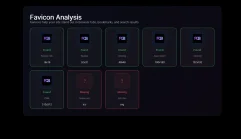
Is your favicon perfect? This free favicon checker validates more than a dozen settings to make sure your icon works correctly on all major platforms — browsers, iOS, Android, Google Search, and Windows. Enter your URL, run the check, and get a clear pass/fail for every file that matters.
Is my favicon.ico correct?
Every browser still auto-requests /favicon.ico from your root, even if you never added a <link> tag for it. If this file is missing or returns a 4xx error, browsers fall back to a blank icon — and some will log a console error on every page load.
Common favicon.ico problems the checker catches:
-
File not found (404). The file does not exist at
/favicon.ico. Upload one to the server root. -
Wrong Content-Type header. The server serves the file with an incorrect MIME type. It should be
image/x-iconorimage/vnd.microsoft.icon. -
Blocked by robots.txt. If
/favicon.icois disallowed, Googlebot and other crawlers cannot fetch it. Check your robots.txt and remove any rule that blocks the path. - File too small. A 16×16 ICO is technically valid but looks blurry on HiDPI displays. Use a 256×256 ICO for best results across all contexts.
favicon.ico at your site root and add <link rel="shortcut icon" href="/favicon.ico"> to your <head>.
Will my favicon appear on iOS?
When a user adds your website to their iPhone or iPad home screen, iOS looks for apple-touch-icon.png. This is separate from your browser favicon. If the file is missing, iOS generates a blurry screenshot of your page instead of showing a clean icon.
What the checker validates for iOS:
-
apple-touch-icon.png exists at the expected path (usually
/favicons/apple-touch-icon.pngor/apple-touch-icon.png). -
The
<link>tag is present in your HTML:<link rel="apple-touch-icon" sizes="180x180" href="/favicons/apple-touch-icon.png">. - Correct size. Apple requires exactly 180×180 pixels. Smaller images are upscaled and appear blurry.
Is my favicon ready for Google Search results?
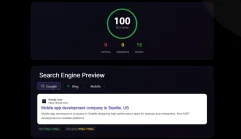
Google displays your favicon in the search results next to your page title and URL. When it’s missing, your listing looks unbranded and earns less trust. Google has specific requirements that many sites fail silently:
- Minimum size: 48×48 pixels. Google ignores icons smaller than 48px. A 16×16 PNG or a tiny ICO won’t be shown. The icon must also be a multiple of 48px in size.
- Publicly accessible. The icon URL must return a 200 response with no authentication, no redirect loop, and no CORS restriction. Googlebot must be able to fetch it directly.
-
Not blocked by robots.txt. Add
Allow: /favicon.icoandAllow: /favicons/if those paths are covered by a broaderDisallowrule. -
Correct HTML tag. Google reads the
<link rel="icon">tag in your page’s<head>. If the tag is absent it falls back to/favicon.ico. - Square aspect ratio. Google crops non-square icons to a circle. Use a square image to control how it looks after cropping.
After fixing your favicon, go to Google Search Console → URL Inspection → Request Indexing on your homepage. It typically takes 24–72 hours to appear, and up to a week for the favicon cache to update.
Are my PNG favicons valid?
Modern browsers prefer PNG over ICO for crisp rendering, especially on HiDPI and Retina screens. The checker verifies the three raster sizes that cover all major browser contexts:
- 16×16 px — Standard browser tab. Used by older browsers and some system contexts.
- 32×32 px — Windows taskbar, pinned sites, and high-DPI tabs.
- 48×48 px — Desktop shortcuts and the minimum size accepted by Google Search.
Each file should be correctly linked in your HTML with its corresponding sizes attribute:
Does my Android and PWA icon work?
Android Chrome does not use the <link rel="icon"> tags for home screen icons. Instead it reads the manifest.webmanifest file. The checker validates:
- favicon-192.png exists. This is the standard Android home screen icon. Linked from the manifest as a 192×192 icon.
- favicon-512.png exists. Used for PWA splash screens and high-resolution contexts. Required for "Add to Home Screen" prompts on Android.
-
manifest.webmanifest is reachable. The manifest must be linked via
<link rel="manifest">and must return a valid JSON response.
/favicons/manifest.webmanifest, then "src": "favicon-192.png" resolves to /favicons/favicon-192.png.
Is my SVG favicon set up correctly?
SVG favicons are the modern standard supported by Chrome, Firefox, Edge, Opera, and Safari 15+. They render crisply at any resolution and can respond to dark mode via CSS media queries embedded in the SVG. The checker confirms whether your SVG icon is reachable and correctly linked:
<link rel="icon" type="image/svg+xml" href="/favicons/favicon.svg">The SVG favicon is not critical for site function — browsers fall back to ICO or PNG gracefully — but it is the cleanest solution for modern browsers and eliminates pixelation at all zoom levels.
Favicon Checker: Quick Fix Reference
-
favicon.ico missing → Upload a 256×256 ICO to
/ -
favicon.png missing → Upload a 96×96 PNG to
/ -
PNG sizes missing → Upload 16, 32, 48px PNGs to
/favicons/ -
apple-touch-icon missing → Upload a 180×180 PNG to
/favicons/ - favicon-192.png missing → Upload 192×192 PNG and check your manifest path
- favicon-512.png missing → Upload 512×512 PNG and check your manifest path
- Favicon not in Google → Check robots.txt, ensure 48px+ size, request re-indexing in Search Console
Need to create these files from scratch? Use the free favicon generator — upload one image and download the complete set ready to deploy.