Unminify JavaScript Online — Unpack and Beautify JS Free
Minified JavaScript is fast to deliver but nearly impossible to read. A JavaScript unminify tool reformats compressed code by adding proper indentation, line breaks, and spacing — turning a single unreadable line into clean, browsable source code.
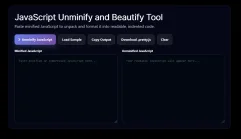
This tool runs entirely in your browser. Paste any minified or packed JavaScript, click Unminify, and get a human-readable, properly indented version in seconds. Nothing is uploaded to a server.
When Do You Need to Unminify JavaScript?
There are many legitimate reasons to unpack minified JS:
Debugging a third-party script that was shipped minified
Understanding what a library or widget does before including it
Recovering readable code when the source map is missing
Reviewing vendor code for security or compliance purposes
Editing a script when the original source file is unavailable
Tip: Unminifying restores formatting — indentation, line breaks, and spacing — but it cannot recover original variable names if the script was also uglified (i.e., variable names replaced with single letters). For that you would need a source map or a deobfuscator.
Unminify vs Unpack vs Beautify: What Is the Difference?
Unminify and beautify mean the same thing: restore indentation and whitespace to make compressed code readable. Unpack usually refers to eval-packed scripts (like those compressed with p,a,c,k,e,d packing), which require execution to decode. This tool handles standard minified JavaScript. For eval-packed code, you can manually paste the string argument to see the packed source.
Example: Before and After JavaScript Unminification
function getDiscountedPrice(price,discount){if(discount<=0||discount>=100){return price;}return price-(price*discount/100);}
Paste minified JavaScript to unpack and format it into readable, indented code.
Size Comparison
Input Size0 B
Output Size0 B
Size Increase0 B
Expansion0%
Everything runs in your browser. Your JavaScript is never uploaded to any server.
How This JavaScript Unminifier Works
This tool parses your minified JavaScript token by token, inserting line breaks after semicolons and braces, adding proper indentation per block level, and preserving string literals, template literals, and regular expressions unchanged. The result is cleanly formatted code you can read and debug immediately.
JavaScript Unminify FAQ
Common questions about decompressing and beautifying JavaScript.
Can I recover the original variable names after unminification?
No. Unminification only restores whitespace and formatting. If a script was also uglified — with variables renamed to single letters — those names cannot be recovered without the original source map file.
Will this work on eval-packed JavaScript?
Eval-packed scripts (using techniques like eval(function(p,a,c,k,e,d){...})) require execution to decode. This tool handles standard minified code. For eval-packed scripts, use a dedicated unpacker or carefully extract and decode the packed string manually in a sandbox environment.
Is it safe to paste third-party code here?
Yes. This tool runs entirely client-side in your browser. No code is transmitted to any server. Your input is processed in memory and never stored or logged.
What is the difference between unminify and deobfuscate?
Unminification restores formatting. Deobfuscation attempts to reverse intentional code obfuscation — renaming, string encoding, control flow mangling. They are different tasks. This tool unminifies; it does not deobfuscate.
Five Quantum Bits is a software engineering company delivering production-grade mobile and backend systems for public institutions and growing businesses.
Building Tomorrow’s Software, Today.