Why Your Favicon Doesn’t Show in Google (and How to Fix It)
Stop generating dozens of favicon files for every possible size. Modern browsers have simplified things dramatically, and you only need a small set of well-chosen icons to ensure your site looks perfect across every platform and device.
Why Most Favicon Setups Are Overcomplicated
Traditional favicon generators output 20 or more files — a relic from an era when every browser and OS required its own specific format and resolution. Developers still ship these bloated icon sets out of habit, adding unnecessary weight to projects without any measurable benefit.
The truth is that browser support has converged. A lean, intentional favicon setup performs identically to one with dozens of redundant files, while being far easier to maintain.
Favicon Not Showing in Google? Start Here
If your favicon doesn’t show in Google search results, it’s usually one of these:
- The icon isn’t accessible at the expected URL (check
/favicon.pngand/favicon.ico). - The page hasn’t been recrawled yet (use Search Console URL Inspection and request indexing).
- The favicon is blocked by
robots.txtor returns a 4xx/5xx status. - The HTML is missing the icon tags or the manifest path is wrong.
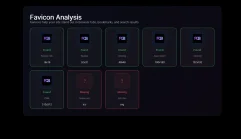
Run the checker below to confirm what Google can actually fetch, then generate the fixed set in one click.
The Favicon Files That Cover Every Platform (and where to put them)
Use this exact layout — it matches the generator and the checker on this page:
-
/favicon.png— 96×96 PNG at the site root -
/favicon.ico— 256×256 ICO at the site root -
/favicons/favicon.svg— scalable vector icon with dark mode support -
/favicons/favicon-16x16.png— small raster icon -
/favicons/favicon-32x32.png— taskbar-sized raster icon -
/favicons/favicon-48x48.png— desktop/high-DPI raster icon -
/favicons/apple-touch-icon.png— 180×180 PNG for iOS home screen -
/favicons/favicon-192.png— Android home screen icon (from the manifest) -
/favicons/favicon-512.png— PWA splash screen icon (from the manifest) -
/favicons/manifest.webmanifest— references the 192px and 512px icons for Android/PWA
1. favicon.png (96×96) — Root PNG
Browsers happily downscale this 96×96 PNG for tabs and pinned shortcuts. Keeping it at the root (/favicon.png) ensures every crawler and browser finds it instantly. Preview size kept small on purpose:
2. favicon.ico (256×256) — Root Legacy Fallback
The ICO format keeps old browsers happy. Shipping a single 256×256 image inside the ICO covers high-res Windows contexts without bloating multiple embedded sizes.
/favicon.ico. Keeping this file at the root with an explicit rel="icon" tag gives you cache control while satisfying legacy behavior.
3. favicon.svg — Scalable Favicon With Dark Mode Support
SVG favicons are the modern standard, supported by Chrome, Firefox, Edge, Opera, and Safari 15+. Because SVGs are vector-based, they render crisply at any tab size without pixelation. Even better, you can embed a CSS media query directly inside the SVG to switch colors for dark mode users.
4. favicon-16/32/48.png — Raster Browser Icons
Some contexts still prefer explicit raster icons. Keep these PNGs inside /favicons/ so the HTML links stay organized while providing sharp results for tabs, taskbars, and desktop shortcuts.
5. apple-touch-icon.png — iOS and macOS Safari
When users add your website to their iPhone or iPad home screen, iOS uses the apple-touch-icon.png file. This must be a 180×180 pixel PNG. iOS automatically applies rounded corners and visual effects, so provide a clean square image without your own masking or rounded edges.
6. manifest.webmanifest — The Web App Manifest
The manifest in /favicons/ tells Android Chrome where to find your PWA icons and what sizes are available. Paths are relative to the manifest file itself:
{
  "name": "Your Site",
  "short_name": "Site",
  "icons": [
    { "src": "favicon-192.png", "type": "image/png", "sizes": "192x192" },
    { "src": "favicon-512.png", "type": "image/png", "sizes": "512x512" }
  ],
  "start_url": "/",
  "display": "standalone",
  "theme_color": "#ffffff",
  "background_color": "#ffffff"
}
Complete HTML Favicon Markup
Add these lines inside your HTML head section and you're done:
Root pair + eight files in /favicons/. Full favicon coverage on every major browser and device.
Favicon Sizes You Can Safely Skip
Many older tutorials recommend additional sizes. Once you ship the set above, you can skip the rest:
- 128×128, 144×144 — Legacy for Chrome Web Store/Windows 8 tiles; modern browsers scale from 96px or the ICO.
- Extra-large PNGs (256×256, 384×384) — Android/PWA already pulls 192px and 512px from the manifest; Windows uses the ICO.
Browser and Platform Compatibility
This focused ten-file favicon setup provides complete coverage:
- Google Chrome — Prefers the SVG icon, falls back to ICO
- Mozilla Firefox — Full SVG favicon support
- Microsoft Edge — Uses SVG icon on Chromium-based versions
- Safari (macOS) — SVG favicon support since version 15
- Safari (iOS) — Uses apple-touch-icon.png for home screen bookmarks
- Chrome (Android) — Reads icons from manifest.webmanifest
- Internet Explorer / Legacy Edge — Falls back to favicon.ico
- Opera, Brave, Vivaldi — Chromium-based, uses SVG icon
Favicon Implementation Checklist
- Design your icon as an SVG (
favicon.svg) with optionalprefers-color-scheme: darkmedia query - Export PNG versions: 96×96 (root
favicon.png) plus 16×16, 32×32, 48×48 in/favicons/ - Export a 192×192 PNG (
favicon-192.png) for Android home screen - Export a 512×512 PNG (
favicon-512.png) for PWA splash screens - Convert or export a 256×256 pixel
.icoversion for legacy browser support - Export a 180×180 PNG with 20px inner padding for Apple devices
- Create a
manifest.webmanifestfile referencing both Android PNGs - Add the link tags to every page's head section
Common Favicon Mistakes to Avoid
- Using only favicon.ico — You miss out on crisp SVG rendering and proper mobile home screen icons.
- Forgetting the apple-touch-icon — iOS will show a low-quality screenshot of your page instead of your icon.
- Skipping the manifest — Android Chrome won't display your icon correctly for installed PWAs.
- Generating 20+ icon files — Unnecessary complexity that adds no real-world benefit over the focused ten-file approach.
- Not testing dark mode — An SVG favicon that looks great on light backgrounds may be invisible in dark mode without the media query.